To check paid campaign UTMs in GA4, use consistent source, medium and campaign values, verify that the tags survive redirects, and inspect session source/medium and session campaign in Traffic acquisition. Keep product parameters intact and check collection on a controlled device. For Google Ads, preserve auto-tagging and its click identifiers alongside the naming plan.
This workflow uses a fictional bottle launch. Open the UTM builder and download the campaign URL checklist. The goal is one shared naming record and a verified test journey, not a promise that every click will appear in Analytics.
Agree on names before creating ad links
Give source, medium and campaign stable meanings. In this example, facebook identifies the source, paid_social the medium and autumn_bottle the campaign. Use content to distinguish the creative, such as bag_demo_a or desk_demo_b.
Google's manual campaign-tagging guide explains the UTM fields and their reporting dimensions. Values are case-sensitive. Mixing Facebook, facebook and FACEBOOK can divide a naming scheme that was intended to represent one source.
Write the allowed values in the worksheet before producing a batch. Separate the campaign's durable reporting name from an internal production note that may change daily. Never put a customer's email, phone number or another personal identifier in a campaign URL.
| Field | Example | Meaning in this plan |
|---|---|---|
| Source | Platform sending the visit | |
| Medium | paid_social | Paid social distribution |
| Campaign | autumn_bottle | Shared launch initiative |
| Content | bag_demo_a | Specific creative version |
Build the URL without losing product parameters
Start with the actual destination, including required variant or locale parameters. Our example destination is https://example.com/bottle?variant=green. Add the agreed UTM values using the builder, then copy the result into the worksheet beside the creative filename.
Check that the original variant=green parameter remains present. A link that tracks correctly but opens the wrong product is still a failed preflight. Also inspect special characters and spaces after copying the URL into the advertising interface.
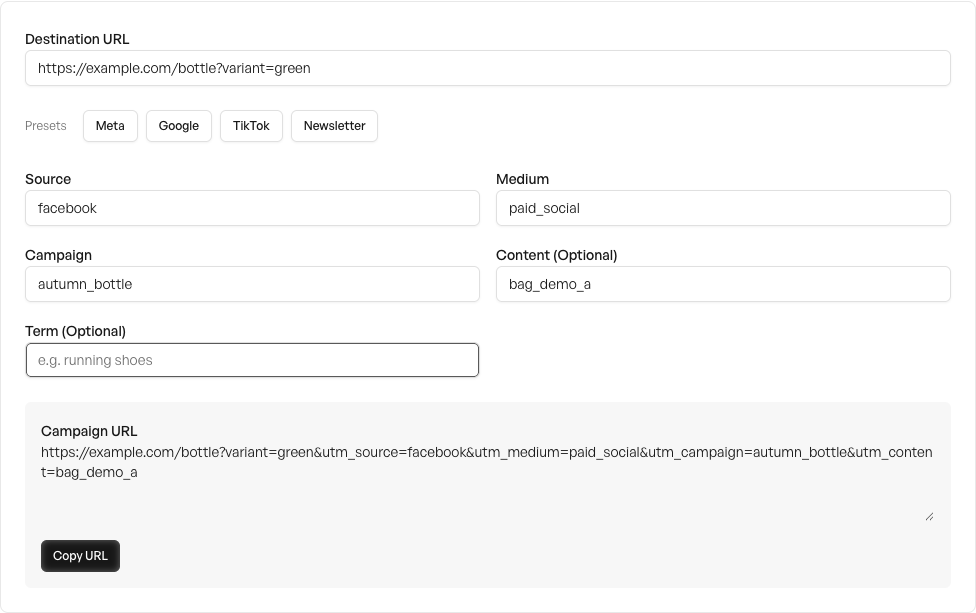 View full size
If your platform supplies dynamic values, use its documented syntax and preview the final result. A macro from one advertising platform is not portable to another. A literal placeholder appearing in GA4 is evidence that the value was not expanded, not a new campaign name to normalize later.
Follow the redirect chain on a real device
Open the finished URL and record both the starting address and the final landing-page address. Test the same link on a phone. Locale selection, an old campaign redirect or a shortened URL may remove parameters before the page loads.
For Google Ads, keep auto-tagging and its click identifiers in the plan. Google's auto-tagging documentation explains GCLID handling and GA4's priority for auto-tagging over manual tags. UTMs do not replace the Google Ads integration, and a manual parameter check should not prompt you to disable it.
Record a redirect failure with the exact starting URL, final URL and timestamp. That gives the developer a reproducible case. Avoid putting an arbitrary made-up GCLID into a report and treating it as proof that real Google Ads attribution works.
Inspect the matching GA4 dimensions
Use a controlled test device and the site's ordinary consent flow. Confirm that the correct property and web stream are being inspected. The DebugView guide describes Tag Assistant and device-level debugging; collection can be affected by consent and privacy controls.
For campaign reporting, inspect session source/medium and session campaign in Traffic acquisition. Keep that scope distinct from first-user acquisition. A returning visitor's first source can be different from the source of the session you are checking.
Google's default channel definitions are rule-based. A custom medium is not guaranteed to land in the channel you intended merely because the name sounds appropriate. Record the observed channel and source/medium separately, then investigate the rule and collected values if they disagree.
Close the check with an observable result
Mark a link ready only when the destination is correct, the expected parameters survive, and the available collection evidence matches the naming plan. If reporting is not yet populated, write “pending report verification” with a review time instead of marking it passed.
Keep campaign-level checks separate from purchase validation. A recorded tagged visit does not prove that the checkout sends a correct order event. Continue with the purchase deduplication checklist for that step, or the Google Ads preflight before launch.
Sources checked October 15, 2026. Example URLs and naming values are fictional. No visitor or advertising-account data was used for this guide.
 Google Ads